AI image models can turn a few words into entire worlds. The difference between a flat render and a breathtaking wallpaper often comes down to how you phrase your prompt. This guide focuses on building prompts that produce dreamlike landscape wallpapers - the kind that feel painted by light rather than pixels.
Understanding What Makes a Landscape Feel Dreamlike
Surreal landscapes balance realism with impossibility. They often include recognizable geography - mountains, lakes, skies - but twist it with unexpected scale or atmosphere. When writing prompts, imagine how a photographer might describe the scene, then add one element that breaks physics.
A prompt like “sunrise over a glass mountain reflected in a floating lake” gives the AI clear structure and a surreal hook. Adding modifiers such as “soft volumetric light” or “misty horizon” helps the model render depth instead of flat gradients.
For inspiration, look at existing works in Nature and Scenery. Notice how color temperature, fog, and perspective guide the eye. These details translate directly into prompt language.
Building Effective AI Prompts Step by Step
Start with a simple base: subject, environment, mood, and style. Then refine each layer.
- Subject: mountain range, desert dunes, forest valley, ocean cliffs.
- Environment: sunrise, twilight, storm, aurora.
- Mood: tranquil, mysterious, ethereal, vast.
- Style: cinematic, painterly, hyperreal, watercolor.
Combine them into a single sentence that flows naturally. Example: “Cinematic view of glowing cliffs under a violet aurora, painted in soft watercolor tones.”
Add Depth and Scale
Depth cues prevent AI landscapes from looking like flat posters. Include foreground and background hints: “wildflowers in focus, mountains fading into fog.” Mention camera type or lens if your generator supports it - “wide-angle, shallow depth of field” often yields stronger composition.
Control Color and Lighting
Dreamlike scenes thrive on contrast. Use lighting adjectives such as “golden haze,” “moonlit mist,” or “bioluminescent glow.” Avoid stacking too many color terms; two or three dominant hues keep the palette balanced.
Prompt Variations That Work Well for Wallpapers
Different prompt structures produce distinct moods. Try these tested patterns:
- Minimal dream: “lonely tree on a hill at dawn, pastel fog, soft focus.”
- Epic fantasy: “floating islands above a glowing ocean, dramatic light rays, cinematic scale.”
- Painterly calm: “misty forest path, watercolor texture, morning light through leaves.”
- Cosmic blend: “mountain peaks under nebula sky, surreal color harmony.”
Each of these can yield a wallpaper-ready composition when rendered at high resolution. Check how the subject sits within the frame; a centered focal point works best for mobile, while wide horizons suit desktop ratios.
If you want to see how reflective surfaces and mist interact, study the Serene Landscape With Crystal Ball Reflection Wallpaper. Its layered reflections show how a prompt emphasizing transparency and symmetry can create a meditative effect.
Refining Outputs for Wallpaper Quality
AI generators sometimes over-sharpen textures or blur edges. After rendering, upscale or lightly retouch to remove artifacts. Keep these checks in mind:
- Resolution: at least 3840x2160 for 4K displays.
- Aspect ratio: 16:9 for desktops, 9:16 for phones.
- Compression: export as PNG or high-quality JPEG to preserve gradients.
When testing multiple renders, view them full-screen on your device. Subtle banding or color shifts that seem minor in preview can stand out on OLED panels.
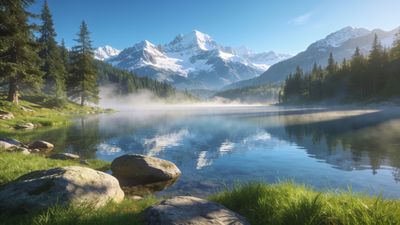
For a balanced composition example, look at the Tranquil Mountain Lake With Misty Reflections Wallpaper. Its symmetry and muted palette illustrate how restraint can make an image feel otherworldly yet believable.
Expanding Your Creative Range
Once you master natural scenery, experiment with hybrid prompts. Merge categories like Fantasy or Digital Art to introduce surreal architecture or glowing flora. The key is to keep one grounding element - a horizon, a body of water, or a recognizable sky - so the scene remains readable as a landscape.
You can also remix your own outputs by feeding them back into the generator with new lighting or texture instructions. This iterative method often produces the most cohesive dream sequences.
Next Steps
Save your favorite prompts and results. Tag them consistently when uploading so others can discover them through shared searches. The community thrives on clear prompt examples that reveal how imagination becomes scenery.
Whether you prefer misty realism or cosmic abstraction, the right words can paint entire worlds. Start small, refine often, and watch your landscapes evolve into wallpapers worth collecting.