Creating fantasy wallpapers with AI is about more than describing dragons or castles. The real magic comes from how light interacts with mist, glass, and atmosphere. A well-phrased prompt can turn a simple castle scene into a glowing world that feels alive.
Understanding Ethereal Lighting in AI Art
Ethereal lighting is that soft, dreamlike glow that makes fantasy scenes shimmer. It often combines volumetric fog, rim light, and subtle color gradients. When you ask your AI model for ethereal light, it interprets this as a mix of diffusion and glow around bright areas.
To get consistent results, include lighting direction and tone. For example:
- “sunlight filtering through enchanted mist”
- “bioluminescent glow from floating crystals”
- “moonlight reflecting on marble ruins”
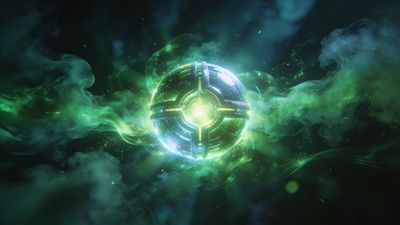
Each phrase teaches the model how to balance contrast and atmosphere. You can see this effect in the Glowing Orb in Mystical Green Mist Wallpaper, where the light feels suspended in air rather than painted on top.
Building the Perfect Fantasy Prompt
A strong AI prompt mixes subject, environment, lighting, and style. Think of it as a sentence describing a cinematic shot rather than a list of objects.
Structure example:
majestic elven city at twilight, glowing waterfalls, ethereal lighting, cinematic composition, ultra-detailed fantasy art
Break down your prompt into these layers:
- Subject: the main focus (castle, forest, phoenix)
- Setting: where it exists (floating island, ancient ruins)
- Lighting: how it feels (soft moonlight, glowing particles)
- Mood: emotional tone (serene, mysterious, divine)
- Style cue: art direction (concept art, matte painting, 8K render)
When you combine these, the AI builds a visual hierarchy that guides composition and depth. For inspiration, browse the Fantasy category to see how creators balance light and subject placement.
Prompt Variations That Change the Mood
Small wording changes can shift the entire tone of a render. Try these swaps to explore different emotional palettes:
- Replace “sunrise” with “dawn mist” for softer gradients.
- Add “glowing embers” to introduce warmth.
- Use “divine aura” for holy or celestial themes.
- Try “underwater glow” for surreal dreamscapes.
Each variation affects how diffusion and shadow interact. The Majestic Golden Phoenix in Starry Sky Wallpaper shows how a single light source can define both character and background.
Refining Through Negative Prompts
Negative prompts help remove distractions like overexposed highlights or unwanted artifacts. Common filters include:
- “no text, no watermark”
- “avoid overexposure, no harsh shadows”
- “no blurry edges, no extra limbs”
Use them sparingly. Too many negatives can make the model hesitant, flattening the glow that gives fantasy art its life.
Color Palettes for Dreamlike Worlds
Color defines atmosphere as much as lighting. Pairing complementary tones enhances the ethereal effect:
- Cool palette: teal, violet, silver - ideal for moonlit forests.
- Warm palette: amber, rose, gold - perfect for divine or sunrise scenes.
- Mixed palette: turquoise and magenta - creates surreal tension.
Experiment with hue cues in your prompt, such as “lavender haze” or “gold dust illumination.” If you prefer a more abstract approach, explore Digital Art for examples of color-driven fantasy compositions.
Workflow Tips for Consistent Results
- Start wide: Generate multiple drafts with different lighting phrases.
- Refine: Keep the same seed and adjust only one variable - lighting or mood.
- Upscale carefully: Some diffusion models blur glow edges when upscaled; use high-resolution settings from the start.
- Post-process lightly: Adjust contrast or bloom, but avoid crushing shadows that carry subtle gradients.
Saving your favorite outputs into collections helps track which lighting cues perform best. Over time, you’ll build a personal library of prompt fragments that consistently yield cinematic results.
From Prompt to Wallpaper
Once you’ve generated a scene that feels alive, export it at your device’s native resolution. Crop thoughtfully - keep the light source or focal point within the center third. Test on both lock and home screens to ensure readability of icons and widgets.
For inspiration, look at ethereal examples in the Ethereal category. Many of these wallpapers balance glow intensity with composition, making them ideal templates for your next AI creation.
Next Steps
Experiment with combining realism and fantasy: a real mountain range with magical lighting, or a city skyline under enchanted fog. Keep notes on which phrasing pairs best with your chosen model version. The more you iterate, the more your results will feel intentional rather than random.
AI art thrives on curiosity. Each prompt is a small spell - the right words summon worlds that never existed until you typed them.